What is each one built for?
They answer different questions. Call recording answers "what happened on that call?" Real-time coaching answers "what do I ask next?" while there is still time to ask it.
- A full record of the call to replay and share.
- Search across many calls for what buyers said.
- Reviews with a manager once the call is over.
- The next question while the buyer is still talking.
- Answers to technical questions from your docs, mid-call.
- Notes that fill in as you talk.
Veracity is a real-time coach. It also gives you a recap after the call and a grade for every question you asked. During the call it keeps a live transcript, encrypted on your computer, and it never saves the audio.
What does help during the call look like?
One question on screen at a time, written while the customer is still answering. Here is a real card from the Veracity app.
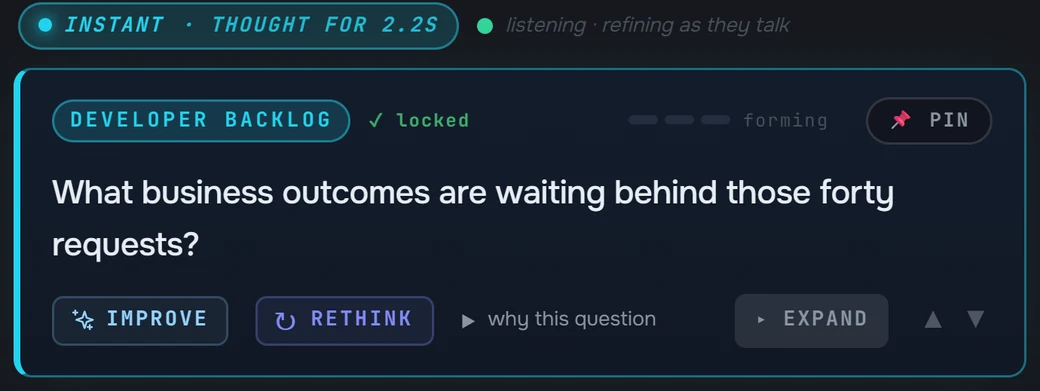
As the customer keeps talking, the question upgrades in place with what they just said. When they ask something technical, you get a line to say from your own documents, with the files it came from named.
When is call recording the better choice?
When you need the call itself afterward: a full recording to replay, to share with someone who missed it, or to search across many calls. Veracity keeps no audio to replay, because the audio is never saved.
If what you need is the better question while the buyer is still on the line, you need help during the call. That is where real-time coaching works.
Can you use real-time coaching and call recording together?
Yes. A recorder for the library, and a coach for the call itself. Veracity can import transcripts from any recorder (.txt, .md, .csv, .vtt or .srt), so calls recorded elsewhere still feed the questions on your next call with that company.
Before every call, Veracity asks you to confirm you have consent to record.
What should you check before you choose?
- When does the rep see help? During the call, or in a review after it.
- Does anything join the meeting? A bot in the attendee list is seen by everyone on the call.
- Is the audio saved, and where? Find out where recordings and transcripts are kept and who can open them.
- Does it work in the room? Some meetings happen in person, with no meeting link.
- Where do answers come from? An answer that names its source file can be checked before you repeat it.
With Veracity, help arrives during the call, no bot joins the meeting, the audio is never saved, it works on Zoom, Teams, Google Meet, Webex and in the room, and every answer names the files it used.