How does Veracity work with Teams?
Join your Teams meeting or call the way you always do, then start Veracity beside it. Veracity hears your microphone and your computer's audio, so it follows the call without joining it: nothing is added to the Teams meeting, and it makes no difference whether your company or the buyer's sent the invite. Before every call, Veracity asks you to confirm you have consent to record. You tell the people on the call you use it, the same way you'd tell them you're recording. The audio is never saved, and the live transcript is encrypted on your computer during the call.
During the Teams call, you get:
- An opening question, ready when the Teams call starts, built from your prep, your research and your earlier calls with the account.
- The next question while the buyer is still talking, 20 words or fewer, upgraded in place with what they just said: "You mentioned..."
- Answers to technical questions from your own documents, PDF, Word, text and Markdown files and your help site, with the files named on the card. When your documents don't cover it, it says so instead of guessing.
- An objection card of 30 words or fewer when the buyer pushes back.
- Notes filled in while you talk, MEDDPICC included.
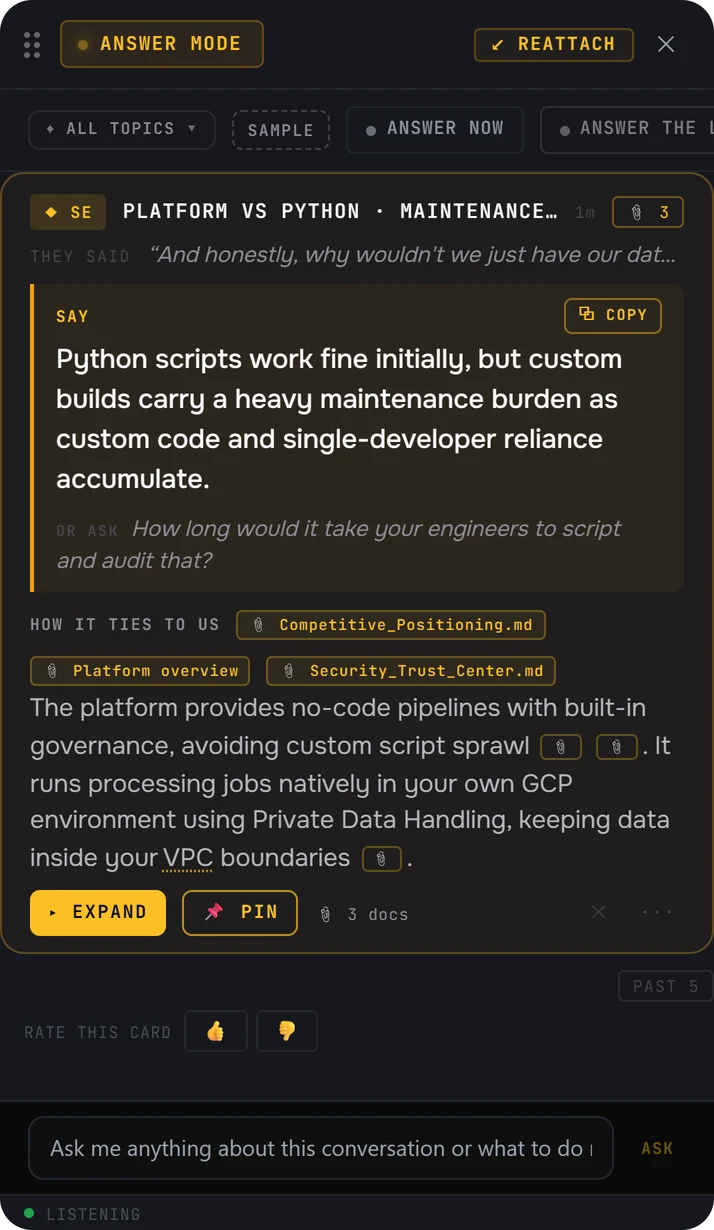
- They said. The buyer's words, so you know which moment the answer is for.
- Say. One line you can say as it is.
- Or ask. A question to hand back to the buyer.
- The files it used, named on the card. This answer used 3 docs.
After the call, every question you asked is graded, with the sentence you could have said instead, and you get a recap and a rating that moves with your calls.
Copilot in Teams vs Veracity
Microsoft's support page says that in a Teams meeting, "Copilot summarizes key discussion points, including who spoke and what they said." The same page says "Copilot won't work in meetings that are hosted outside the participant's organization," and that "Intelligent recap is also available as part of the Microsoft Copilot license."
| Copilot in Teams | Veracity | |
|---|---|---|
| What it is | Microsoft Copilot, inside Teams meetings | A desktop app for Windows and Mac |
| During the meeting | Summarizes key discussion points, including who spoke and what they said | The next question while the buyer is still talking, and answers from your own documents with the files named |
| A meeting your buyer hosts | Won't work in meetings hosted outside your organization | Works the same, because it hears the call through your computer |
| After the meeting | Intelligent recap, part of the Microsoft Copilot license | Every question graded with the sentence you could have said instead, a recap and a rating |
| Where it works | Teams meetings | Beside Teams, Zoom, Google Meet, Webex or any other meeting app |
When Copilot is the right choice
If most of your meetings are inside your own company and you already have Microsoft Copilot, it is built into Teams: you can catch up on a meeting and get a recap after it.
Veracity is built for the sales call itself, including the ones your buyer hosts: what to ask next, and answers from your own documents while the buyer is still talking.
Where the Microsoft facts come from
Every fact about Microsoft on this page comes from Microsoft's own website, checked on November 1, 2026. Products change. If something here is out of date, write to contact@projectveracity.co and we'll fix it.
- 1Microsoft Support: Catch up on meetings with Microsoft Copilot in Teams. support.microsoft.com/en-us/teams/copilot/catch-up-on-meetings-with-microsoft-365-copilot-in-teamsUsed for: what Copilot does in a Teams meeting; it won't work in meetings hosted outside the participant's organization; intelligent recap as part of the Microsoft Copilot license.
Microsoft, Microsoft Teams and Copilot are trademarks of Microsoft. Veracity is not affiliated with Microsoft.