Veracity vs Cluely, side by side
Both run on your computer, both help during the call, and neither one joins the meeting. The biggest difference is how the help arrives. With Cluely, you ask for it. With Veracity, the next question is written while the buyer is still answering, built from what they just said.
| Cluely | Veracity | |
|---|---|---|
| Built for | In its own FAQ, "students, professionals, sales teams, recruiters, consultants, executives" | The rep on a sales call, and their manager |
| Where it runs | A desktop app for macOS and Windows, and an iPhone app | A desktop app for Windows and Mac |
| The meeting | Never joins: "no bots and no extra people on the guest list" | Nothing joins the meeting; it hears your microphone and your computer's audio |
| How help arrives | When you ask: press Cmd/Ctrl + Enter, or pick "What should I say?" or "Follow-up questions" | While the buyer is still answering, it writes one open question, then upgrades it with what they just said |
| Answers | AI answers about "your screen or conversation" | A line to say from your own documents, with the files named |
| Audio | Its FAQ says it "records meetings" | Never saved; a live transcript, encrypted on your computer during the call |
| Notes and review | Meeting notes you can share | Live notes during the call; after it, a recap, every question graded with a better sentence, and a rating |
| Calls it covers | Zoom, Microsoft Teams, Google Meet, Webex and Slack | Zoom, Teams, Google Meet, Webex and meetings in the room |
How help arrives during the call
Cluely's help comes when you ask for it. Its homepage says "When you need help, Cluely assists you instantly," and "Hit Cmd/Ctrl + Enter and Cluely helps you with AI in the moment." Its buttons read "What should I say?" and "Follow-up questions," and you can "ask about your screen or conversation." Its FAQ says it "helps you answer technical questions, handle objections, and perform better during high-stakes conversations."
Cluely's pages don't say whether it puts up a question on its own while the other person is talking, or whether its answers name where they came from.
Veracity puts the help on your screen:
- While the buyer is still answering, it writes one open question of 20 words or fewer, then upgrades it in place with what they just said: "You mentioned..."
- An opening question is ready when the call starts, built from your prep, your research and your earlier calls with the account.
- Nothing on the card changes while you're talking, so a glance is enough.
When the buyer asks a technical question or pushes back, the answer comes from your own documents (PDF, Word, text or Markdown), and the card names the files it used. When your documents don't cover the question, it says so instead of guessing.
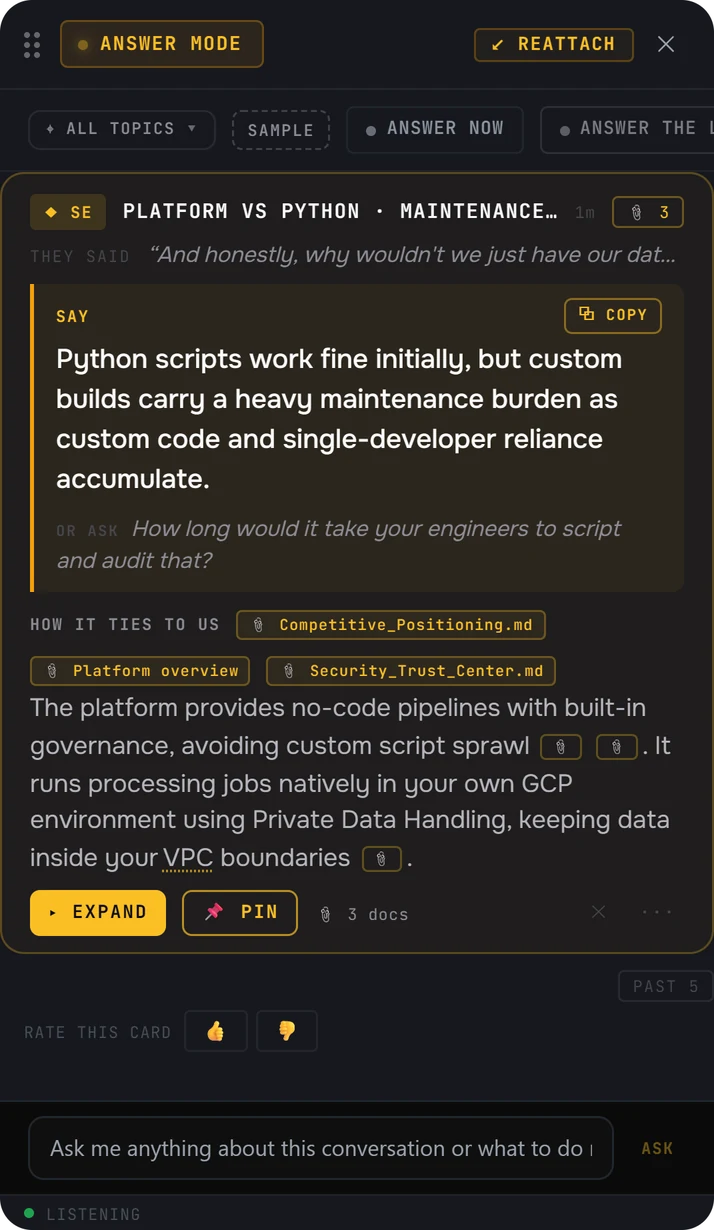
- They said. The buyer's words, so you know which moment the answer is for.
- Say. One line you can say as it is.
- Or ask. A question to hand back to the buyer.
- The files it used, named on the card. This answer used 3 docs.
How consent works
Cluely's homepage says it "never shows up in shared screens, recordings, or external meeting tools," and its FAQ says it is "designed to stay out of screen shares and meeting recordings."
Before every call, Veracity asks you to confirm you have consent to record. You tell the people on the call you use it, the same way you'd tell them you're recording. Nothing joins the meeting, the audio is never saved, and the live transcript is encrypted on your computer during the call.
When Cluely is the right choice
If you want one AI assistant for every kind of meeting, with answers when you ask for them, Cluely is built for that. Its FAQ names "students, professionals, sales teams, recruiters, consultants, executives, and anyone who needs to perform well in meetings." You can ask about your screen as well as the conversation, it supports "over 12 different languages," and it has an iPhone app as well as the desktop app.
Veracity is a desktop app for sales calls, on Windows and Mac. It is built for the call itself: the question you ask next, the answer you give, and a grade on how you did.
Where the Cluely facts come from
Every fact about Cluely on this page comes from Cluely's own website, checked on October 31, 2026. Products change. If something here is out of date, write to contact@projectveracity.co and we'll fix it.
- 1Cluely homepage. cluely.comUsed for: it never joins your meetings; Cmd/Ctrl + Enter and its "What should I say?" and "Follow-up questions" buttons; asking about your screen or conversation; shareable notes; never showing up in shared screens or recordings; over 12 languages; the meeting apps it lists.
- 2Cluely FAQ, on its homepage. cluely.com/#faqUsed for: who it is for; it records meetings and transcribes in real time; help with technical questions and objections; designed to stay out of screen shares and meeting recordings.
- 3Cluely download page. cluely.com/downloadUsed for: the desktop app for macOS and Windows.
- 4Cluely mobile page. cluely.com/mobileUsed for: the iPhone app.
Cluely is a trademark of its owner. Veracity is not affiliated with Cluely.