Sign In
Feature · during the call

Technical answers from your own docs, during the call

The short answer

Yes. Veracity is a desktop app that answers technical questions during a live call from your own documents: PDF, Word, text and Markdown files, plus your help site. Each answer gives you a line to say and names the files it used. When your docs don't cover the question, it tells you instead of guessing.

Updated October 29, 2026 · Veracity
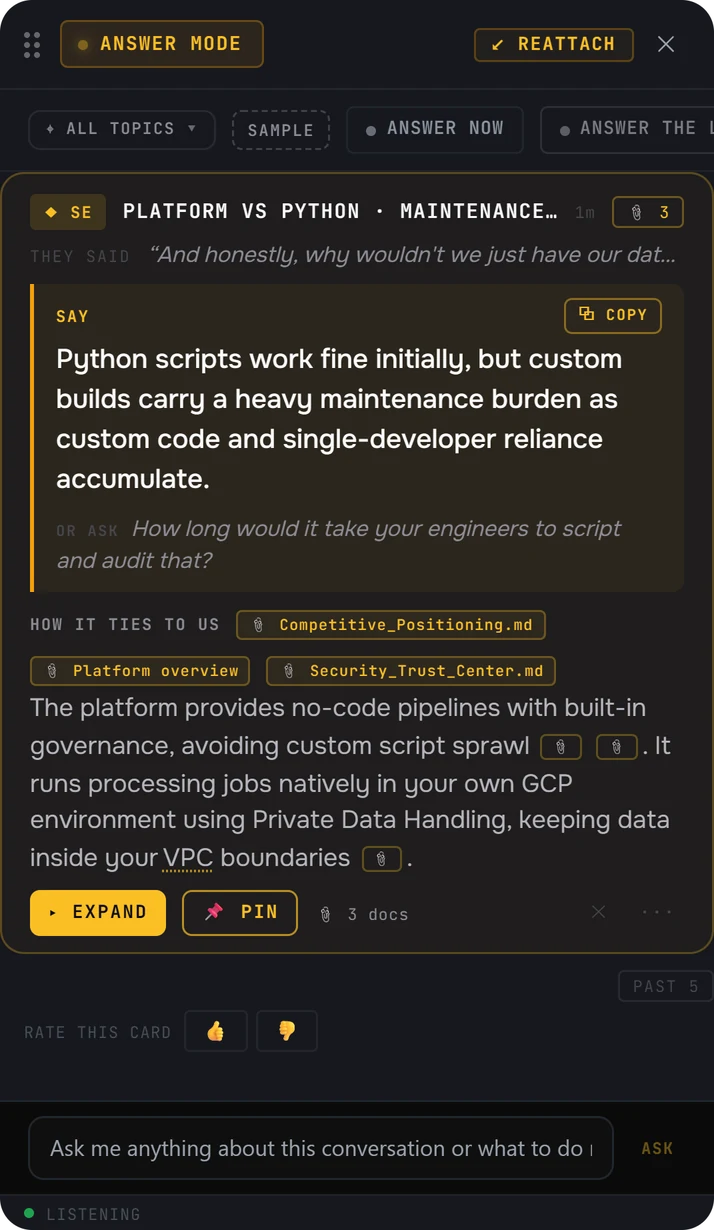
A Veracity answer card in Answer mode: what the buyer said, a line to say about the upkeep of custom Python scripts, a question to ask back, the detail behind it, and three source files named on the card
  • They said. The buyer's words, so you know which moment the answer is for.
  • Say. One line you can say as it is, with a Copy button.
  • Or ask. A question to hand back to the buyer.
  • How it ties to us. The detail behind the line, with a file marker beside each point.
  • The files it used, named on the card. This answer used 3 docs.
A real answer card from the Veracity app. The buyer asked why they wouldn't just script it in Python. The card names the three files it used: Competitive_Positioning.md, Platform overview and Security_Trust_Center.md.
01 / Which documents

Which documents can it answer from?

When the buyer asks something technical, hit Answer. The answer comes from what you and your company have loaded.

FILESYour documents

PDF, Word, text and Markdown files: product docs, security pages, battle cards.

SITEYour help site

Up to 2,000 pages of your own help site can become searchable docs for answers.

TEAMYour company's docs

Documents your company uploads once reach every rep's app.

It all runs in the desktop app beside Zoom, Teams, Google Meet or Webex, on Windows and Mac. No bot joins the meeting, and you confirm you have consent to record before every call.

02 / When your docs don't have it

What happens when your docs don't have the answer?

It tells you your docs don't cover it, instead of guessing. On a technical call, a confident wrong answer comes back to you in the security review.

  • Each answer names the files it used, so you can see where a line came from.
  • Numbers it can't find in a source are removed before the card shows.
  • When your docs don't cover it, it says so instead of guessing.
  • It never tells you to defer. No "let me loop in my SE" and a week of waiting.
03 / What to load first

What should you load first?

Start with the questions buyers ask on every technical call, and load the file that answers each one.

They ask"Where does our data live?"Load your security or trust page: where data is stored and who can reach it.
They ask"Does it work with what we use now?"Load your integration docs: which systems you connect to, and how.
They ask"What happens when we scale it up?"Load your architecture and limits docs: what the product handles, and where it stops.
They ask"Who maintains it after we go live?"Load your support and maintenance docs: what your team does after go-live, and what theirs does.

For what to ask a technical buyer once you've answered, see questions to ask a technical buyer.

04 / Questions

Questions, answered

Yes. Veracity answers technical questions during the call from your own documents and help site. Each answer gives you a line to say and names the files it used.
PDF, Word, text and Markdown files. Your help site can be added too: up to 2,000 pages become searchable docs for answers.
Each answer names the files it used, right on the card.
It tells you your docs don't cover it, instead of guessing. It never tells you to defer the answer to your SE.
No. Documents your company uploads once reach every rep's app.
Keep reading

The answer from your docs, on the call.