Veracity vs Backdrop, side by side
Backdrop calls itself a "Live in-call sales assistant," and its homepage says "During the call, not after." Veracity helps during the call too, so the moment they cover is the same. They differ in where the answers come from, how the question on your screen is built, and what you get after the call.
| Backdrop | Veracity | |
|---|---|---|
| Built for | Tech B2B sales: sales leaders, account executives, technical sales and sales enablement | The rep on the call, and their manager |
| How it gets the call | A desktop app for macOS and Windows that listens to your computer's audio; in its words, "No bot joins" | A desktop app for Windows and Mac that hears your microphone and your computer's audio; nothing joins the meeting |
| Where answers come from | Your battlecards, product docs, objection playbooks and competitive intel, from sources like Google Drive, Confluence, Notion and Zendesk | PDF, Word, text and Markdown files you load, plus up to 2,000 pages of your help site |
| Showing the source | Cites the source behind every suggestion | Names the files each answer used; when your docs don't cover it, it says so |
| During the call | Cards pushed automatically: the next best question, the language your top closers use, technical answers | One open question while the buyer is still answering, upgraded in place with what they just said |
| Sales methods | "MEDDPICC, SPIN or any sales framework you use, tracked from call to call" | MEDDPICC in the live notes, the recap and the rating |
| After the call | A full call summary and a drafted follow-up | A recap, every question graded with a better sentence, and a rating that moves with your calls |
| Calls it covers | Zoom, Microsoft Teams, Google Meet, Webex and other major meeting platforms; Google Meet also in the browser; mobile "coming soon" | Zoom, Teams, Google Meet, Webex and meetings in the room |
Where the answers come from
Backdrop builds its help from your team's knowledge. Its during-calls page says it "maps what's being said against your battlecards, product docs, objection playbooks, and competitive intel to surface the most relevant response." Its integrations page says where that knowledge comes from: "Point Backdrop at Google Drive, Confluence, Notion, Zendesk, or any knowledge source." Each card shows where it came from: "Backdrop cites the source behind every suggestion, whether it comes from a battlecard, product doc, or competitive brief."
Veracity answers from the files you give it:
- Your documents: PDF, Word, text and Markdown files, such as product docs, security pages and battle cards.
- Your help site: up to 2,000 pages can become searchable docs for answers.
- Your company's documents, uploaded once, reach every rep's app.
- Each answer names the files it used, and numbers it can't find in a source are removed. When your docs don't cover the question, it says so instead of guessing.
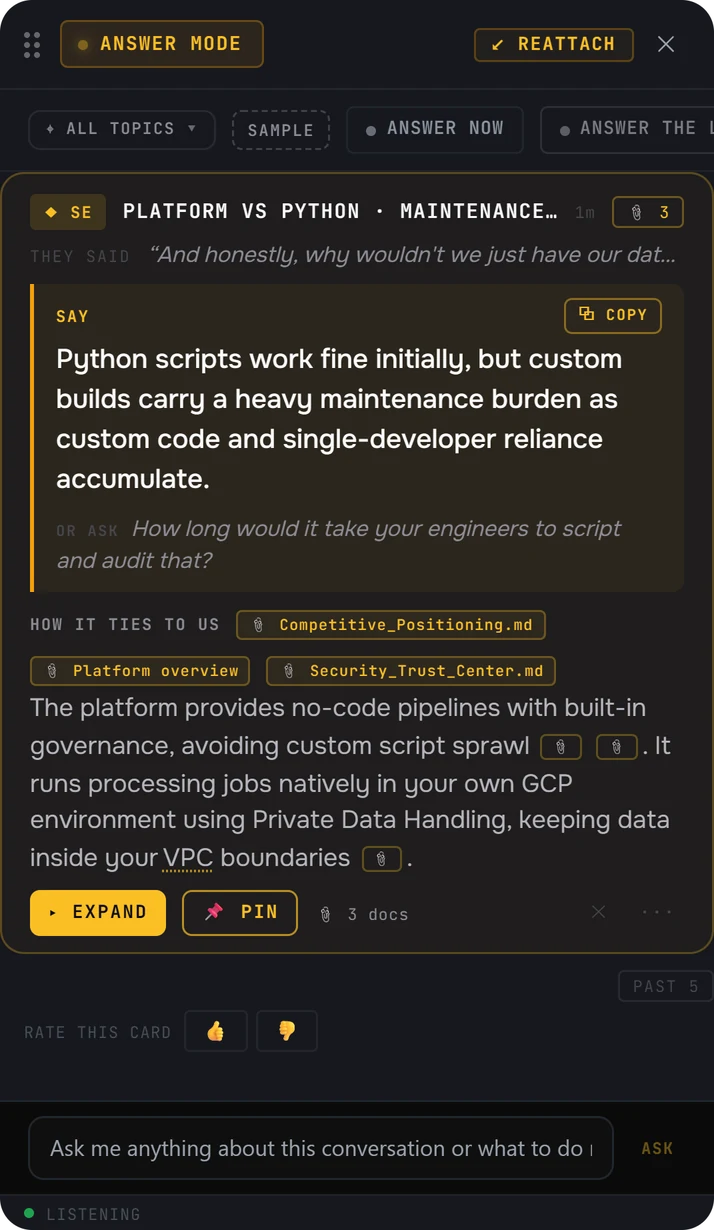
The question on your screen
Backdrop "guides reps through discovery in real time" and "surfaces the next best question based on what's been said so far." Its cards come to you: "Backdrop pushes cards automatically based on what's being said in the live conversation." When a prospect pushes back, it "surfaces the exact language your top closers use."
Here is how Veracity writes what you see:
- An opening question is ready when the call starts, built from your prep, your research and your earlier calls with the account.
- While the buyer is still answering, it writes one open question of 20 words or fewer, then upgrades it in place with what they just said: "You mentioned..."
- The question builds only on facts the buyer said, and it never asks them to pick from a list of options.
- When they push back, an objection card gives you a line to say of 30 words or fewer, with proof from your docs when one matches.
- Nothing on the card changes while you're talking, so a glance is enough.
How does consent work?
Backdrop's homepage puts it this way: "Listens to your computer's audio directly. No bots. No notifications." Its integrations page adds: "No bot joins. Nothing your prospect can see."
Nothing joins the meeting with Veracity either. Before every call, it asks you to confirm you have consent to record, and you tell the people on the call you use it, the same way you'd tell them you're recording. The audio is never saved, and the live transcript is encrypted on your computer during the call.
When Backdrop is the right choice
If your team's knowledge already lives in Google Drive, Confluence, Notion or Zendesk, Backdrop connects to it, and its integrations page says "The AI Sales Hub auto-builds and stays current as your content changes." It tracks "MEDDPICC, SPIN or any sales framework you use" from call to call. Its post-call page covers a full call summary and a drafted follow-up, under the line "All the stuff that needs to happen post call. Done." Its site says it is "Built for tech B2B sales," with pages for sales leaders, account executives, technical sales and sales enablement.
Veracity's answers come from the files you load and your help site, and it works in meetings in the room, which the Backdrop pages listed below don't mention. After the call, its rating gives you one thing to work on, and managers see team and per-person call scores by week.
Where the Backdrop facts come from
Every fact about Backdrop on this page comes from Backdrop's own website, checked on October 31, 2026. Products change. If something here is out of date, write to contact@projectveracity.co and we'll fix it.
- 1Backdrop homepage. getbackdrop.aiUsed for: "Live in-call sales assistant" and "During the call, not after"; it listens to your computer's audio, with no bots and no notifications; Mac and Windows, mobile coming soon; built for tech B2B sales, with pages for sales leaders, account executives, technical sales and sales enablement; discovery coaching; MEDDPICC, SPIN or any framework, tracked from call to call.
- 2Backdrop during calls page. getbackdrop.ai/features/during-callsUsed for: the meeting platforms it works with; it maps the call against battlecards, product docs, objection playbooks and competitive intel; cards pushed automatically, within seconds; the language your top closers use; technical answers; it cites the source behind every suggestion.
- 3Backdrop integrations page. getbackdrop.ai/integrationsUsed for: a native desktop app for macOS and Windows, browser-based for Google Meet; no bot joins and nothing your prospect can see; Google Drive, Confluence, Notion and Zendesk; the AI Sales Hub.
- 4Backdrop post calls page. getbackdrop.ai/features/post-callsUsed for: "All the stuff that needs to happen post call. Done."; the full call summary and the drafted follow-up.
Backdrop is a trademark of its owner. Veracity is not affiliated with Backdrop.